Home › Products › Add-ons › Phone import software (Paikar)

Paikar Import, the import module of NextPOS

+৳499/month

Phone import software that follows every phone from your money abroad to your shelf

For shops that bring phones from China, Dubai or anywhere else. Paikar Import keeps the money you send, each foreign dealer, each carrier and every IMEI in one place, and puts received phones into your NextPOS stock at their real landed cost. ৳499 a month on top of Basic ERP.

  • Needs Basic ERP (mobile shops)
  • Received phones go straight into your stock

Watch an import from start to finish (4 minutes, Bangla)

Paikar Import: phone import from money abroad to stock 4:10

Send money abroad at an average rate, buy from a foreign dealer by IMEI, hand phones to a carrier, receive them into stock at landed cost, mark seized phones, then the dealer and carrier ledgers and the report.

  1. Send money
  2. Buy from a dealer
  3. Carrier and receive
  4. Ledgers and report
ShareWhatsAppFacebook

Money sent abroad, at the right rate

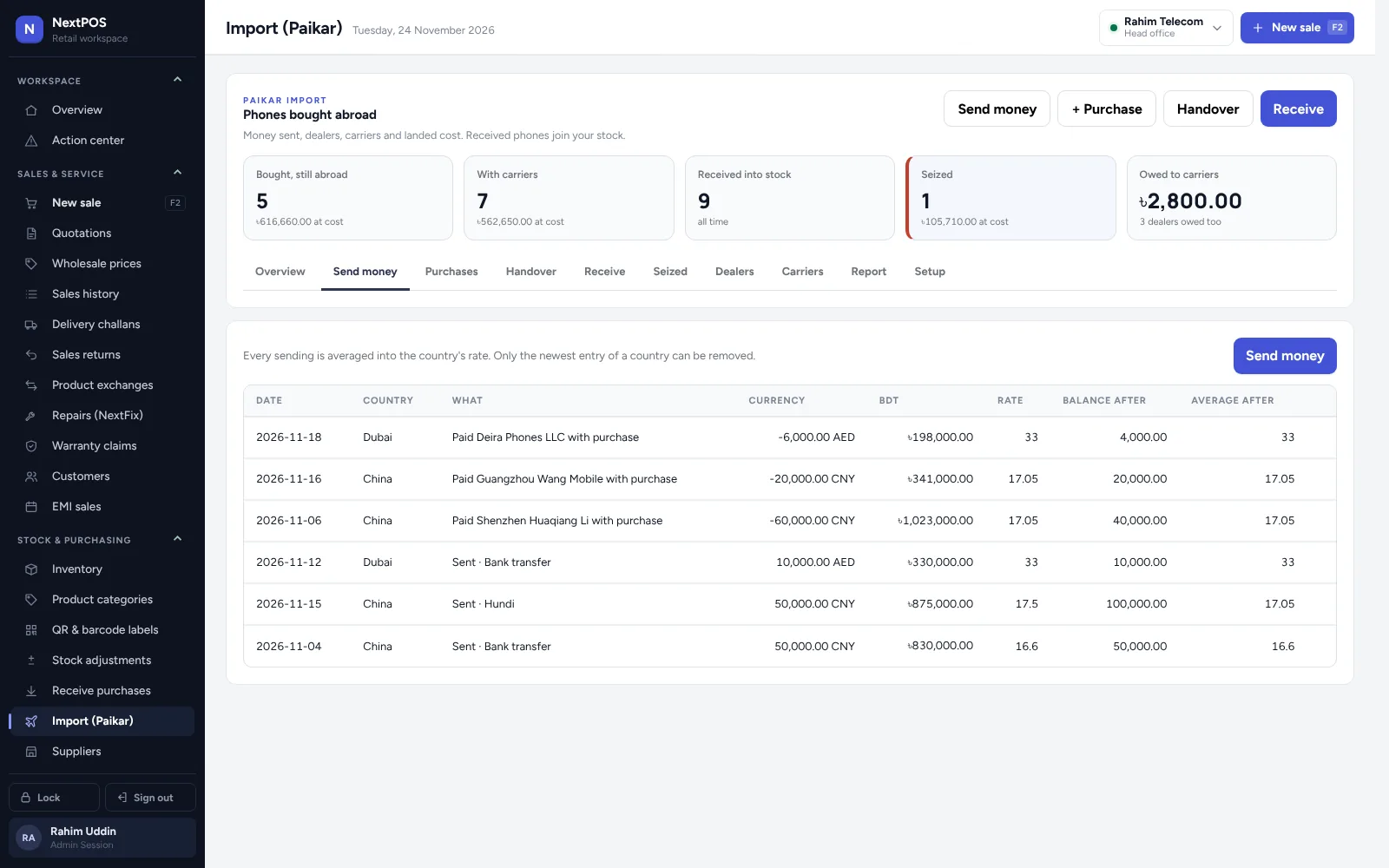
Each time you send taka, enter what went out and what the other side received. Paikar Import keeps a balance per country and blends every sending into an average rate, so a phone bought next week is costed at what your money really cost you, not at today’s market rate.

  • The taka leaves your cash, bank or bKash account in NextPOS
  • CNY, AED, USD or any currency, one balance per country
  • A wrong entry? Remove the newest one and the average goes back
Paikar Import: money sent to China and Dubai with the average rate

Foreign dealers and purchases by IMEI

Write a purchase the way the dealer sends it: model, RAM and ROM, colour, region, price in their currency, then paste or scan the IMEIs. Every IMEI is checked, so a typo or a phone already bought is caught before you save. The rate is locked on the day, and the dealer’s ledger shows what you owe in their own currency.

  • Pay a dealer from the money already abroad
  • Find any phone by IMEI, model, purchase or dealer
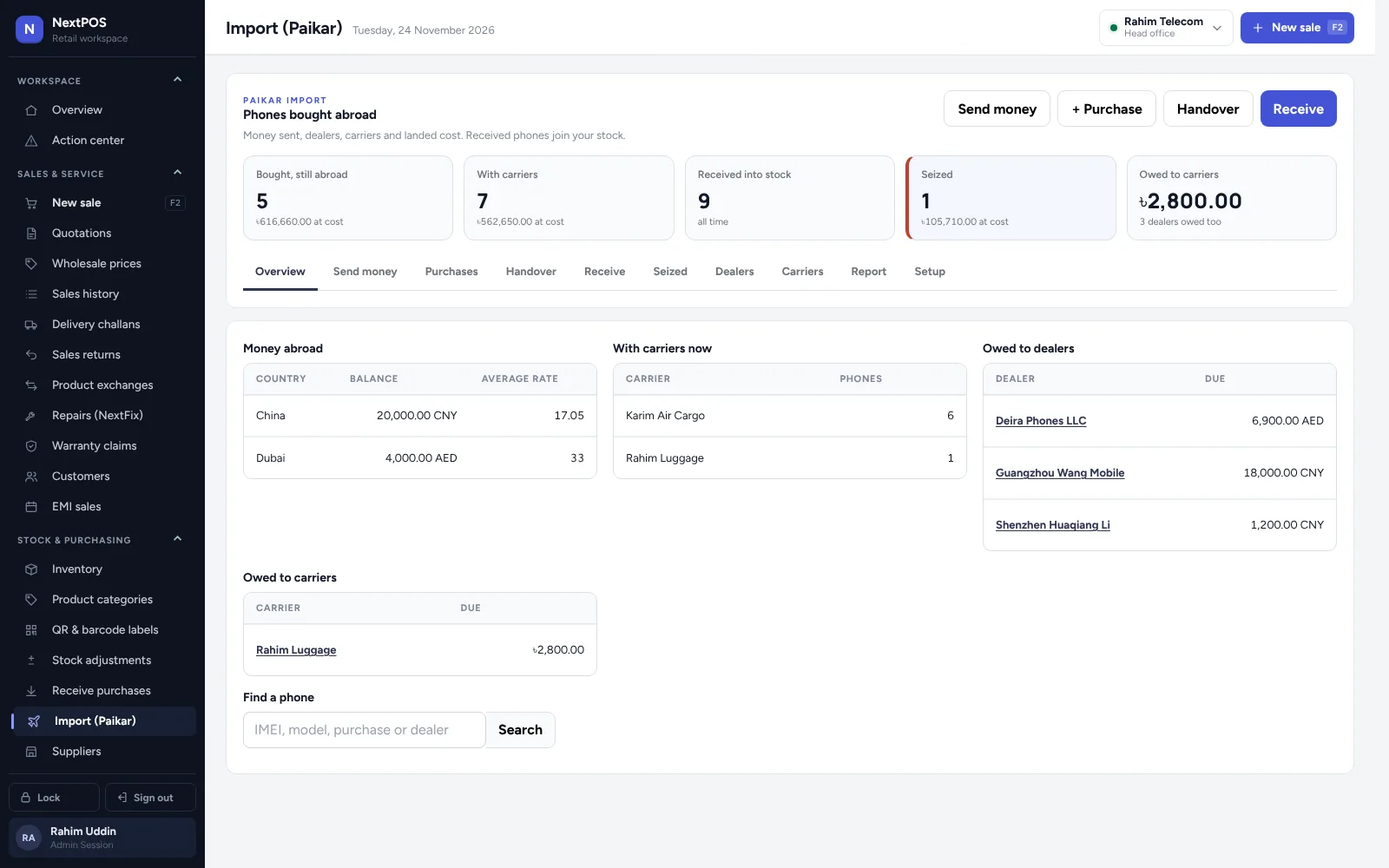
Paikar Import overview: phones abroad, with carriers, received and seized, and what you owe each dealer

Carriers, receiving and the landed cost

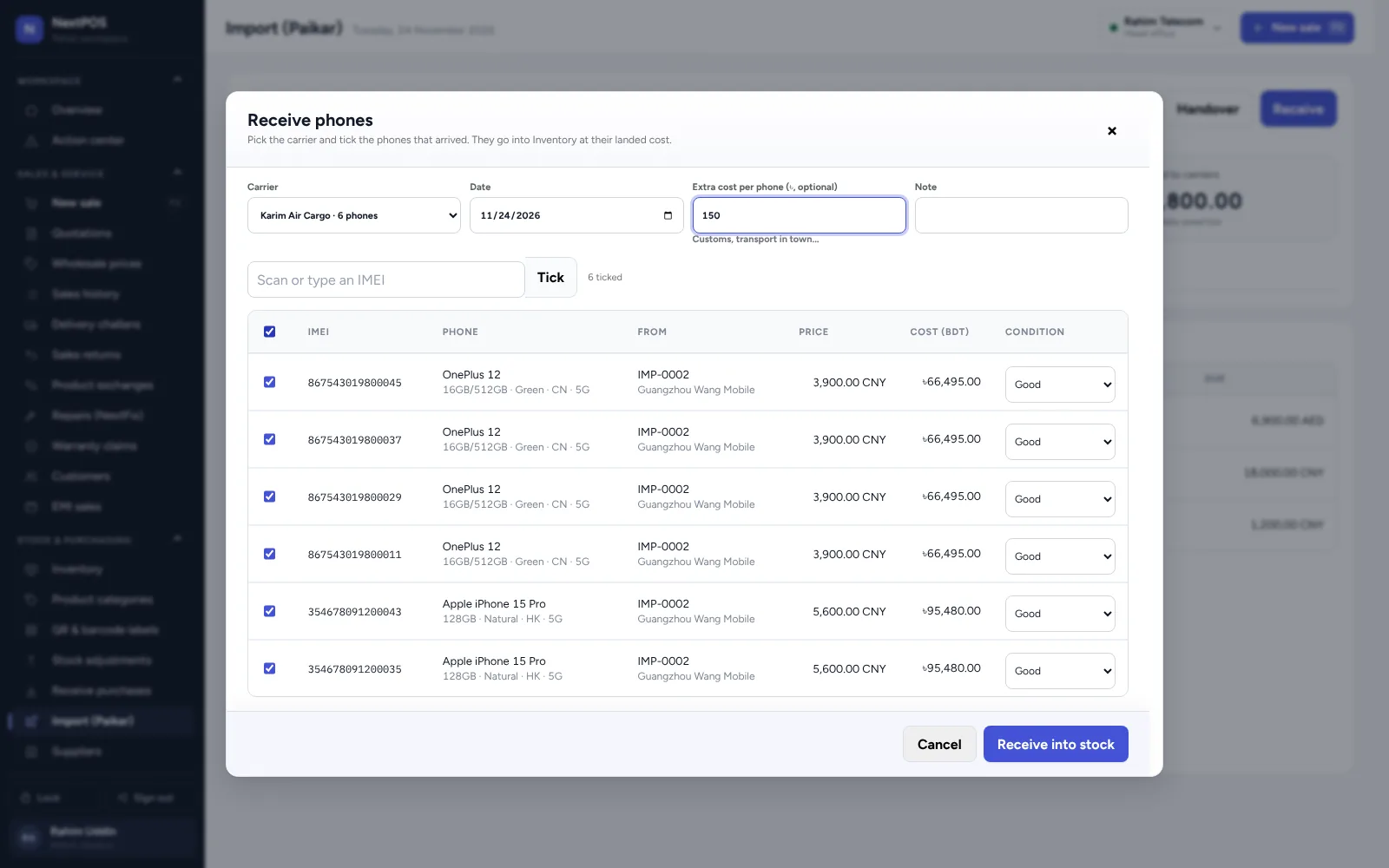
Hand the phones to a carrier with their charge per phone. When they arrive, pick the carrier, scan or tick what came and add any extra cost. The phones go straight into Inventory with their IMEIs, at the dealer price times your average rate, plus carrying and extra. From there you sell them like any other phone, and the profit you see is the real profit.

  • Mark a box as damaged or a phone as dented when it arrives
  • Seized phones are written off at cost, and any money the carrier gives back reduces what you owe them
  • Your stock staff can hand over and receive without seeing the money
Paikar Import: receiving phones from a carrier into stock at landed cost

Every dealer and carrier, settled

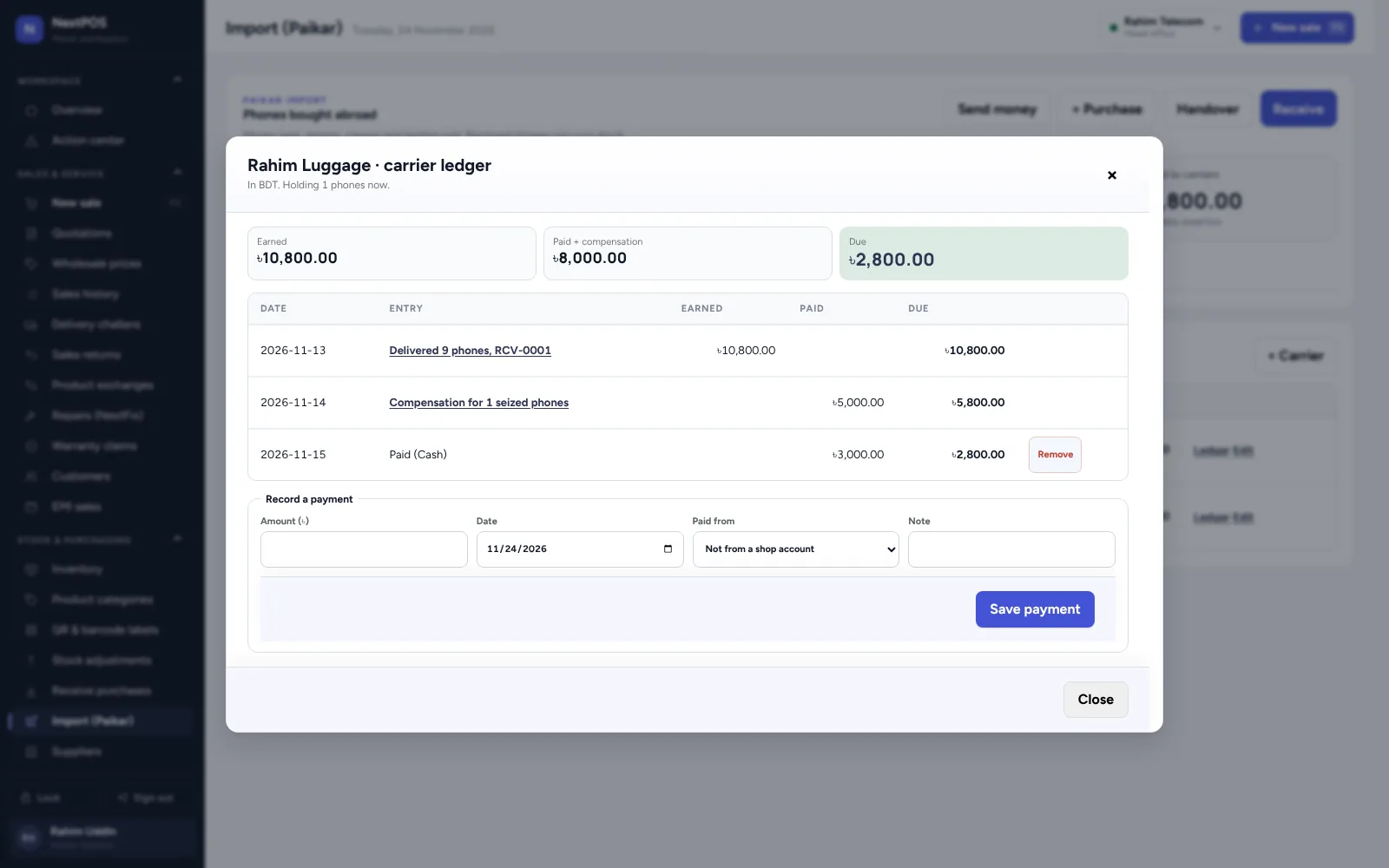
Open a dealer or a carrier and see each purchase, delivery, seizure and payment with the running due. Pay a carrier from your cash or bank and it shows in your day close as an import payment, never as an expense or a refund.

Paikar Import: a carrier ledger with deliveries, compensation and payments

One report for the whole import business

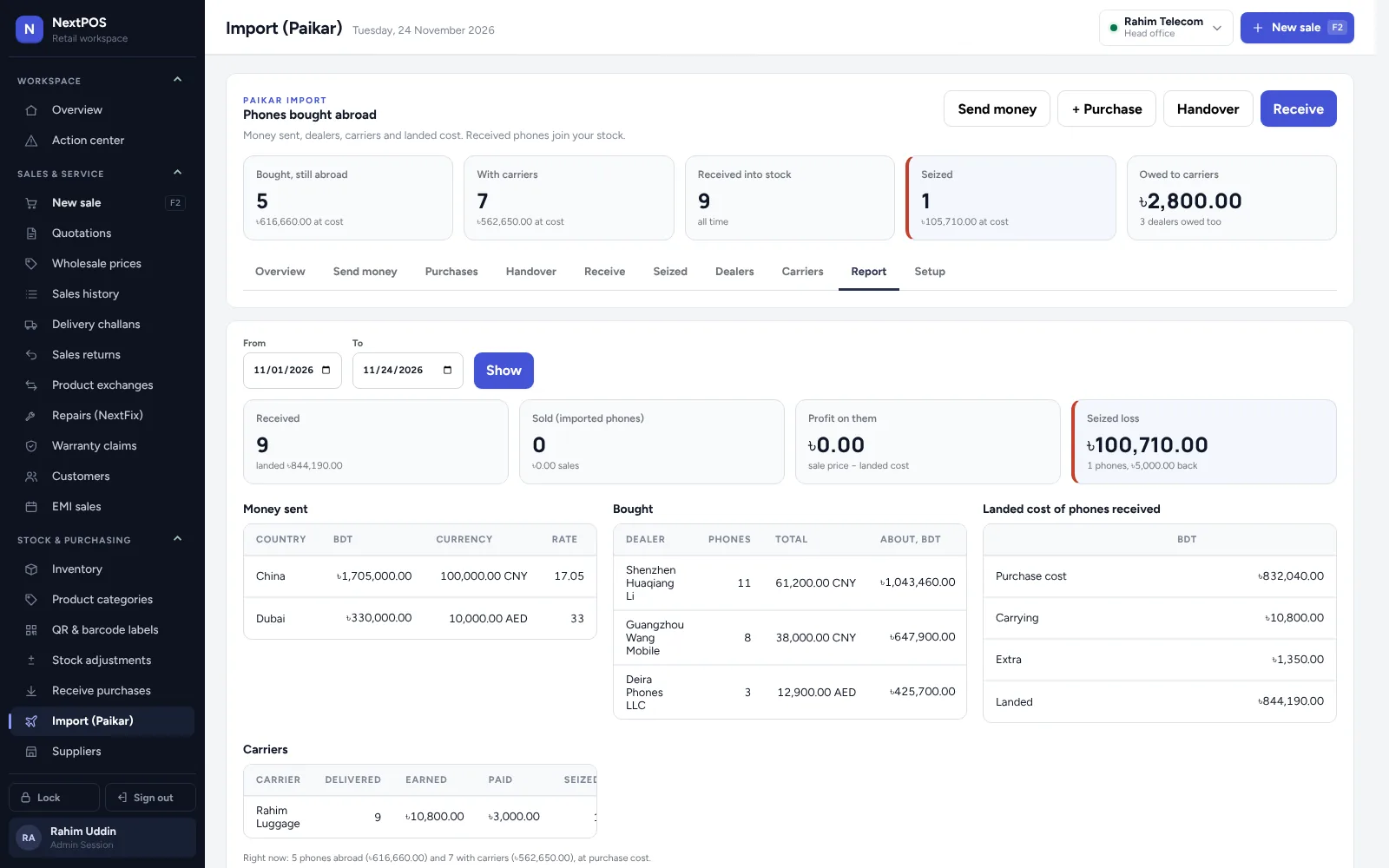
Pick the dates and see money sent per country, what you bought from each dealer, the landed cost of what arrived, carriers, seized losses, and how the imported phones sold, with the profit on them.

Paikar Import report: money sent, bought per dealer, landed cost, carriers and seized loss

What it costs

Paikar Import is ৳499 a month on top of Basic ERP (from ৳499 a month), so your import book, stock, sales and money stay in one shop. It is in the 30-day free trial, and with 12 months paid you get 2 free. See all prices.

Questions shop owners ask

Is this the same as Paikar?
It is the import side of Paikar, rebuilt inside NextPOS: money sent abroad, foreign dealers, carriers, receiving, seized phones and the landed cost. Because it lives in your NextPOS shop, received phones become your stock straight away and nothing is typed twice.
Do I need Basic ERP too?
Yes. Paikar Import is an add-on for mobile shops on Basic ERP, because received phones are sold from your NextPOS stock. Many importers also add Wholesale to send dealers a daily price list.
How is the landed cost worked out?
Dealer price × the average rate of that country when you bought, plus the carrier’s charge per phone, plus any extra cost per phone you add when receiving. That is the cost each phone carries in your stock and in your profit.
What happens when customs seizes phones?
Mark them as seized. The loss is counted at what you paid for them, and if the carrier pays you something back it comes off what you owe that carrier. The report shows the seized loss for any dates.
Can my staff use it?
The owner and managers see everything. Stock staff can hand phones to carriers and receive them, but they do not see the money sent, the dealers’ dues or the payments.
WhatsApp Free trial